Company Details
Company Details holds your organization's core identity information — its name, logo, address, contacts, currency, and the schedule for automated company report emails. This is usually the first thing an administrator sets up, and several other areas (such as your default work location) build on what you enter here.
How to access
Settings → Company Profile → Company Details tab
What you can do
Company photo
Upload a company logo in PNG, JPG, or JPEG format. Files of about 5 MB or larger won't be accepted — the upload is simply skipped without applying, so keep your logo file smaller than that. You can also remove the current logo if you no longer want one displayed.
Fields
| Field | What it's for | Required | Notes |
|---|---|---|---|
| Organization Name | Your company's name, shown in the header and elsewhere | Yes, max 25 characters | Cannot be blank/spaces only |
| Organization Address | Your company's main address; also used as the default work location's address | Yes, max 255 characters | Entering an address automatically looks up its map coordinates |
| Owners | The user(s) who own/administer the company account | Yes | Choose from your organization's users |
| Latitude / Longitude | Map coordinates for the address | No | Filled in automatically from the address; you can adjust manually |
| Country | Country for the company address | Yes | — |
| State | State/province | Yes | Options depend on the selected Country |
| City | City | Yes | Options depend on the selected State |
| ZIP Code | Postal code | Yes, max 255 characters | — |
| Timezone | The company's primary timezone | Yes | Used across scheduling and reporting |
| Date Format | How dates are displayed | No | Choose DD/MM/YYYY, MM/DD/YYYY, or YYYY/DD/MM; defaults to DD/MM/YYYY |
| Base Currency | The company's default currency | No | Used for rates and billing amounts |
| Business Phone | A general company phone number | No | Validated against the selected country's phone format |
| Mobile Phone | A company mobile contact number | Yes | Validated against the selected country's phone format, up to 10 digits |
| Default Hourly Rate | A default billing/pay rate used where a more specific rate isn't set | No | — |
| Industry | Your company's industry | No | Choose from a standard list (e.g. Information Technology, Construction, Education Management, and others) |
| Email Recipient | Who receives the automated company report emails | Yes | Choose one or more users |
| Email Frequency | How often report emails are sent | Yes | Daily, Weekly, or Monthly |
| Send Email On | Which day (Weekly) or date (Monthly) the report email goes out | Only shown for Weekly/Monthly | Weekly: choose a day of the week; Monthly: choose a date (1–31) |
| Send Email At | What time the report email is sent | Yes | — |
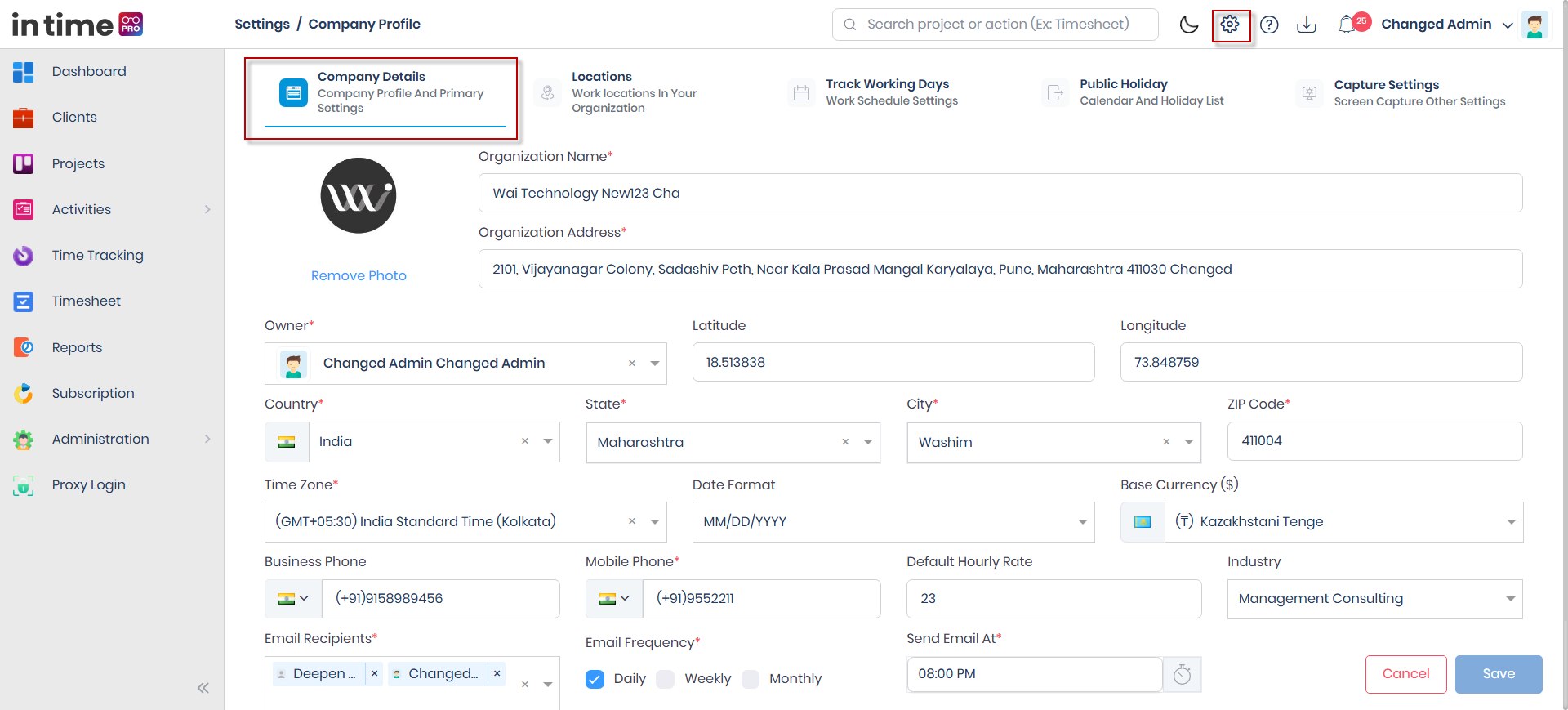
Screenshot: Company Details
The Company Details tab, with the logo upload, address/contact fields, and the report email schedule fields.
Save / Cancel
- Save stays disabled until you actually change something. There's also a short delay between clicking Save and it completing — this is intentional, to avoid accidental double-submits.
- Cancel returns you to the Dashboard without saving.
Step-by-step workflow
- Open Settings → Company Profile → Company Details.
- Upload a company logo, if you want one (PNG, JPG, or JPEG, under about 5 MB).
- Fill in the Organization Name, Organization Address, Owners, and location fields (Country, State, City, ZIP Code, Timezone).
- Set Date Format, Base Currency, Business Phone, Mobile Phone, Default Hourly Rate, and Industry as needed.
- Choose the Email Recipient(s), Email Frequency, Send Email On (if Weekly or Monthly), and Send Email At.
- Choose Save.
Expected result
You see a confirmation message: "Changes updated successfully." The company name and logo update in the header immediately.
Saving Company Details also updates your company's default work location (used on the Locations page) to match the address, city, state, ZIP, country, timezone, owner, and email settings you just entered.
Common validations
| Situation | What you see |
|---|---|
| Organization Name, Address, Owner, Country, State, City, ZIP, Timezone, Mobile Phone, Email Recipient, Email Frequency, or Send Email At left blank | A "this field is mandatory" message for that field; Save is blocked |
| Invalid phone number format | Number is not valid |
| Logo file larger than about 5 MB | The upload doesn't apply; choose a smaller image |